šŸ“¢ How to Subscribe to a Category and Get Notified of New Topics

More
1 month 3 weeks ago #592 by Brent Graham
A number of members have said they would you like to receive an email whenever aĀ new discussion is startedĀ in your favourite part of the forum? Here’s how to do it šŸ‘‡

šŸ”¹ Step 1: Go to the Category
  • From the forum homepage, click into the category you want to follow.
    (Example: ā€œBetting Tipsā€ or ā€œUse Guideā€)
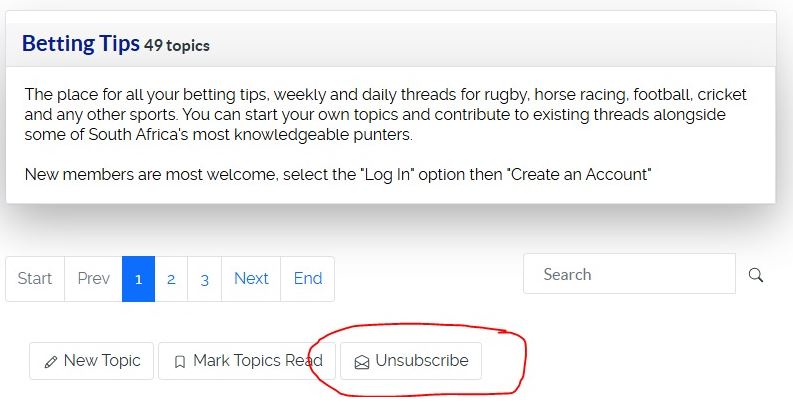
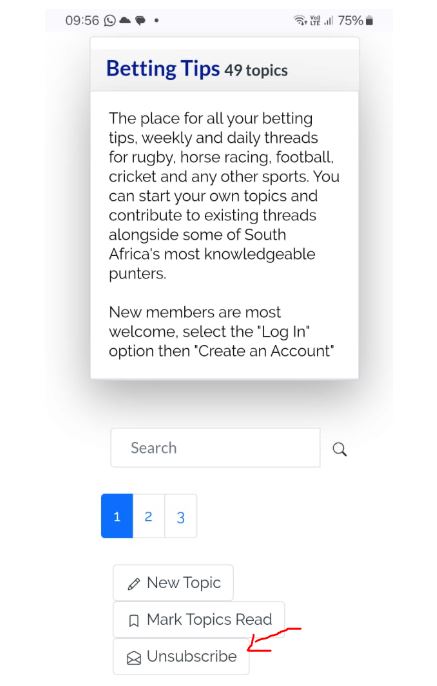
šŸ”¹ Step 2: ClickĀ Subscribe
  • At theĀ top right (or bottom right)Ā of the category page you’ll see a button/link:
    • SubscribeĀ (if you’re not yet subscribed)
    • UnsubscribeĀ (if you’re already subscribed)
ClickĀ Subscribe. āœ…

View on desktopĀ 
Ā 

View on MobileĀ 
Ā 

šŸ”¹ Step 3: What Happens Next
  • You will now receiveĀ one emailĀ each time a new topic is created in that category.
  • You willĀ notĀ receive emails for replies unless you also subscribe to the topic itself (see below).
šŸ”¹ Bonus: Subscribe to Individual Topics
  • When you open a topic, look for theĀ SubscribeĀ button/link.
  • Or, if you post in a topic, leave theĀ ā€œSubscribe to this topicā€Ā box ticked at the bottom of the posting form.
  • This way you’ll get an email when there are new replies in that topic.

Ā 
The following user(s) said Thank You: Quill

Please Log in or Create an account to join the conversation.

Cookie Notice and Terms and Conditions

This site uses cookies to ensure the best experience. By continuing to use this website, you agree to their use. See the Privacy Policy and Terms and Conditions for more information.